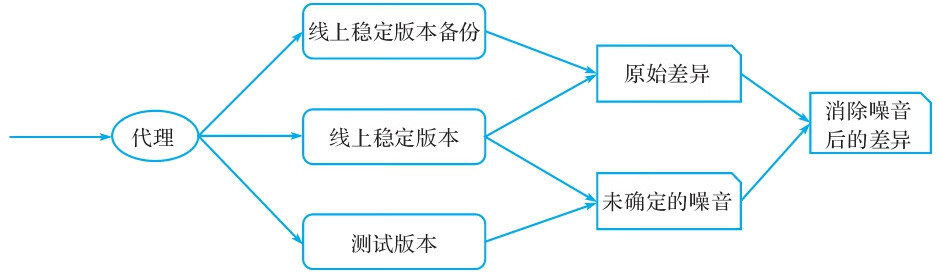
Diffy可以作为代理,截取请求并发送至所有运行的服务实例,通过对比响应结果来发现每次迭代代码中可能存在的问题。其中,Diffy上运行了三类代码实例(如图4-16所示):
·线上稳定版本:一个运行线上稳定版本代码的节点。
·线上稳定版本备份:同样运行了线上的稳定版本,用于消除噪音。
·测试版本:待上线的测试版本,用于和线上环境代码进行对比。
图4-16 Diffy运行机制
在实际Diffy测试中,会发现大部分的接口都会有一定差异,原因是这些响应中存在噪音,噪音可能包括:
·server响应中生成的时间戳。
·随机生成的数字。
·系统服务间的有条件竞争。
Diffy能够通过一定的方式清除这类噪音,保证分析结果不被影响。
下面的YAML代码(可参见diff.yaml)包括一个Diffy的Kubernetes Service与一个相应的Kubernetes Dep-loyment资源定义描述,可以创建出一个可运行的Diffy服务:
apiVersion: v1
kind: Service
metadata:
  name: httpbin-diffy
  labels:
    app: httpbin-diffy
spec:
  ports:
  - name: http-proxy
    port: 8880
  - name: http-admin
    port: 8881
  - name: http-console
    port: 8888
  selector:
    app: httpbin-diffy
---
apiVersion: extensions/v1beta1
kind: Deployment
metadata:
  labels:
    app: httpbin-diffy
    version: v2
  name: httpbin-diffy-v2
spec:
  replicas: 1
  selector:
    matchLabels:
      app: httpbin-diffy
      version: v2
  template:
    metadata:
      labels:
        app: httpbin-diffy
        version: v2
    spec:
      containers:
      - image: diffy/diffy:latest
        imagePullPolicy: IfNotPresent
        livenessProbe:
          exec:
            command:
            - curl
            - localhost:8888
          initialDelaySeconds: 10
          periodSeconds: 60
          timeoutSeconds: 1
        name: httpbin-diffy
        args: ["-candidate=httpbin-candidate:8080", "-master.primary=httpbin-master:8080", "-master.secondary=httpbin-master:8080", "-service.protocol=http", "-serviceName=httpbin", "-proxy.port=:8880", "-admin.port=:8881", "-http.port=:8888",
 "-rootUrl='localhost:8888'"]
        ports:
        - containerPort: 8888
          name: http-console
          protocol: TCP
        - containerPort: 8880
          name: http-proxy
          protocol: TCP
        - containerPort: 8881
          name: http-admin
          protocol: TCP
        readinessProbe:
          exec:
            command:
            - curl
            - localhost:8888
          initialDelaySeconds: 10
          periodSeconds: 60
          timeoutSeconds: 1
        securityContext:
          privileged: false
通过以下YAML(具体可参见httpbin-service.yaml)创建示例所用的primary、secondary(当前示例中与primary相同)与candidate服务:
apiVersion: v1
kind: Service
metadata:
  name: httpbin-master
  labels:
    app: httpbin-master
spec:
  ports:
  - name: http
    port: 8080
  selector:
    app: httpbin
    version: v1
---
apiVersion: v1
kind: Service
metadata:
  name: httpbin-candidate
  labels:
    app: httpbin-candidate
spec:
  ports:
  - name: http
    port: 8080
  selector:
    app: httpbin
    version: v2
---
apiVersion: extensions/v1beta1
kind: Deployment
metadata:
  name: httpbin-v1
spec:
  replicas: 1
  template:
    metadata:
      labels:
        app: httpbin
        version: v1
    spec:
      containers:
      - image: docker.io/kennethreitz/httpbin
        imagePullPolicy: IfNotPresent
        name: httpbin
        command: ["gunicorn", "--access-logfile", "-", "-b", "0.0.0.0:8080", "httpbin:app"]
        ports:
        - containerPort: 8080
---
apiVersion: extensions/v1beta1
kind: Deployment
metadata:
  name: httpbin-v2
spec:
  replicas: 1
  template:
    metadata:
      labels:
        app: httpbin
        version: v2
    spec:
      containers:
      - image: docker.io/kennethreitz/httpbin
        imagePullPolicy: IfNotPresent
        name: httpbin
        command: ["gunicorn", "--access-logfile", "-", "-b", "0.0.0.0:8080", "httpbin:app"]
        ports:
        - containerPort: 8080